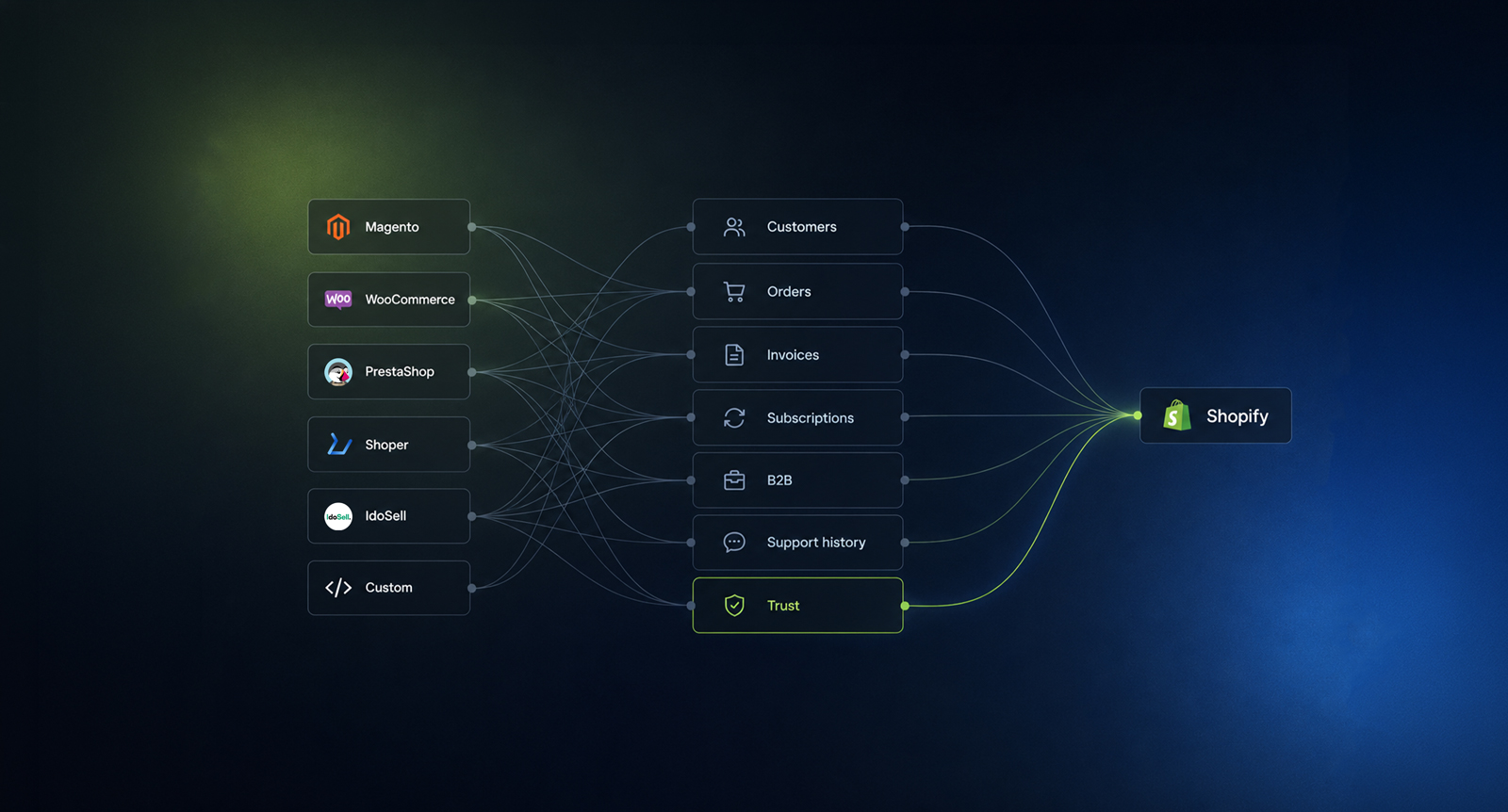
A Shopify migration doesn’t end when the new store goes live.
It ends when every customer account, every order, every product, and every piece of business data has been migrated correctly - without creating problems for your customers or your team.
We’ve helped many brands recover from migrations that looked successful on launch day but later resulted in missing order history, broken customer accounts, incorrect product data, or months of manual fixes.
This blog is written for founders, ecommerce managers, and growing brands who want to understand how a successful Shopify migration should be planned - before expensive mistakes happen.
The storefront is live. Checkout works. Products are visible. Redirects are in place. The team has posted the launch announcement.
Then the support inbox starts filling up.
Where is my previous order?
Why can't I download my invoice?
Why does my account look empty?
Why doesn't your support team see what I bought last year?
For a new customer, this may be a small inconvenience. For a loyal customer, a B2B buyer, a subscriber or someone waiting on a warranty claim, it's a serious trust problem. They don't care that the platform changed. They care that the store still remembers them.
That is why customer and order history shouldn't be treated as a small data import at the end of a Shopify migration. It needs to be planned early, mapped carefully and tested before launch.
Many teams start a migration by asking a simple question: can we move our customers to Shopify?
Usually, yes. But the better question is what customer history actually means in your business.
For a small DTC store, it may mean customer accounts, addresses, newsletter consent and past orders. For a larger brand, it may include returns, loyalty points, subscriptions, B2B company accounts, invoice history, tax IDs, support tickets, wholesale pricing, ERP references, marketplace orders and customer segments.
Those are different data problems.
A CSV export of customers is not enough if your support team needs full order context. A list of order IDs is not enough if your finance team needs invoices tied to the right customer. A customer account is not enough if active subscribers lose their billing state.
Before any import happens, the migration team should define which customer data matters after launch and why.
In most migration projects, customer and order migration covers several data groups.
Customer records usually include names, email addresses, phone numbers, default addresses, billing addresses, shipping addresses, tags, notes, marketing consent and account status.
Order history can include order numbers, dates, line items, SKUs, quantities, prices, discounts, taxes, shipping methods, payment status, fulfillment status, tracking numbers and refunds.
There may also be custom data. Magento and WooCommerce stores often carry years of custom fields, module data and third-party plugin history. PrestaShop, Shopware, Shoper, IdoSell and custom platforms can all store customer and order data in different ways. Sometimes the data is clean. Sometimes it has been patched together over years of platform changes, plugin updates and manual admin work.
Shopify can receive a lot of that history, but it won't always map one-to-one.
Some data belongs inside Shopify as native customer or order data. Some data is better stored as metafields. Some should live in an external system, such as ERP, OMS, WMS, CRM, subscription software, loyalty software or a helpdesk. Some shouldn't be migrated at all because it's obsolete, duplicated or legally risky to keep.
The goal isn't to move every field blindly. The goal is to preserve the data your team and customers will actually need.
Customer passwords are one of the most misunderstood parts of ecommerce migration.
In most cases, passwords cannot be migrated from Magento, WooCommerce, PrestaShop, Shopware, Shoper, IdoSell or a custom platform into Shopify in a usable form. That is normal. Password hashes are designed to be difficult to move and read.
For customers, this means one thing: they may need to activate their account or reset their password after the move.
This is not a failure if it is communicated properly.
The problem starts when the store launches without explaining what changed. A loyal customer tries to log in, their old password doesn't work, and the reset email feels like a bug. Support then has to explain the migration one customer at a time.
A better plan includes pre-launch and post-launch communication:
For stores with high repeat purchase rates, subscriptions or B2B buyers, this step matters a lot.
Historical orders are not just archive data.
Support uses them to answer questions. Finance uses them for invoices, refunds and tax context. Ecommerce teams use them for segmentation and email flows. Customers use them to reorder products, check previous sizes, download documents or confirm warranty details.
If historical orders are missing or badly mapped, the damage shows up across the business.
Support tickets take longer because the team has to search across the old platform, ERP or spreadsheets. Customers lose confidence because their account no longer reflects their purchase history. Email segmentation gets weaker because purchase-based flows no longer have the same data. B2B buyers may lose reorder context, which is often one of the main reasons they log in.
The right migration plan answers these questions before development starts:
For some stores, migrating all historical orders into Shopify is the right decision. For others, the cleaner choice is to migrate recent orders into Shopify and keep older records in ERP or a data warehouse.
There is no universal answer. There is a correct answer for your operations.
Every source platform has its own migration patterns.
Magento and Adobe Commerce stores often carry complex order states, custom attributes, B2B logic, ERP references, multi-store data and long redirect histories. The data model is powerful, but that also means there can be a lot of custom logic hidden in the store.
WooCommerce stores often depend on plugins. Customer fields, invoices, subscriptions, product bundles, memberships, loyalty points and custom checkout fields may all come from different plugins. The migration has to identify which plugin created which data and where that data should live on Shopify.
PrestaShop and Shopware migrations often need careful category, tax, language and customer group mapping. The structure may look simple from the storefront, then become more complex once order data, customer groups and local market rules are reviewed.
Shoper and IdoSell migrations are common in the Polish market. The core challenge is usually operational continuity: payments, invoices, ERP, warehouse workflows, customer accounts, local delivery methods and order documents. Shopify can replace the storefront, but the business process around the order has to be rebuilt with care.
Custom platforms can be the easiest or the hardest. If the data model is clean and documented, migration can be direct. If the original developers are gone and the platform has been patched for years, the first phase becomes data archaeology.
BigCommerce and Shopify-to-Shopify migrations are usually more structured, but they still need planning. Moving between SaaS platforms doesn't remove the need to map historical orders, customer IDs, metafields, integrations and analytics.
Bad data migration rarely fails loudly on launch day. It tends to fail through small, expensive problems.
A customer logs in and sees an empty order history.
Support can't find a previous order inside the new admin.
The finance team can't match old order IDs to invoices.
Klaviyo or another email platform loses purchase-based segments.
Subscription customers are duplicated.
B2B buyers lose company account context.
Refunds and returns require manual checking in the old platform.
Loyalty points don't match the customer's real purchase history.
Analytics treats returning customers as new customers.
None of these issues may break checkout. But they make the business feel less reliable from the customer's side. They also create internal cleanup work after launch, when the team should be focused on trading, merchandising and conversion.
At Nethype, we treat customer and order migration as part of the main migration strategy, not as a late technical task.
The first step is an audit. We identify where customer and order data lives today, which systems use it and what has to be available after launch. That includes the source platform, ERP, WMS, OMS, CRM, email marketing, loyalty, reviews, subscriptions, helpdesk, analytics and any custom apps.
Then we create a data mapping plan. For each field, we decide where it should go on Shopify or outside Shopify. Native data, metafields, third-party apps, external systems and archive storage all have different roles.
Before launch, we run test imports. We don't only check whether the import finished. We check whether real customer scenarios still work:
After launch, we monitor account activation, support tickets, failed emails, checkout issues, order sync and customer complaints. The first weeks matter. A good migration plan includes them.
Moving all historical data into Shopify sounds safe, but more data doesn't always mean a better store.
Old records may be duplicated, incomplete, legally unnecessary or no longer useful. Some data may be better kept in ERP, accounting software or a secure archive. Some custom fields may reflect old business rules that no longer apply.
This is especially true for stores that have been running for many years.
Before moving everything, ask what each data group is for:
If the answer is no, archive may be better than import.
The cleanest migrations don't copy the past blindly. They preserve what matters and remove what has become operational clutter.
Before moving to Shopify, your team should be able to answer these questions:
If these questions aren't answered before development starts, the migration has a blind spot.
A Shopify migration changes more than the storefront. It changes how the business stores, reads and uses customer history.
For the customer, the platform is invisible until something goes wrong. They expect their account, orders, invoices, subscriptions and support history to make sense after the move.
That expectation should be part of the migration scope from the first audit.
If you're planning a migration from Magento, WooCommerce, PrestaShop, Shopware, Shoper, IdoSell, BigCommerce or a custom platform to Shopify, start with the data your customers will notice first.
Products matter. SEO matters. Design matters.
Customer memory matters too.
Nethype helps ecommerce brands move to Shopify and Shopify Plus with a focus on storefront quality, data migration, integrations, UX and post-launch stability.
If you're preparing a migration and want to understand what will happen to your customer accounts, order history and business data, contact us at info@nethype.co
We'll help you map the risks before they become support tickets.