Migrating an established store to Shopify is one of the highest-stakes decisions an ecommerce founder makes. Done well, you keep your SEO, retain your customers, and end up on a faster, more reliable platform with lower long-term maintenance costs. Done poorly, you can lose 20-30% of organic traffic, frustrate loyal customers, and spend the next 12 months recovering.
This guide is for founders and ecommerce leaders evaluating a move to Shopify. It's not a DIY tutorial. It's an honest look at what migration actually involves - what changes for your business, how long it takes, what determines whether SEO survives the move, and what to look for in a partner who'll do this with you.
Most stores don't migrate because Shopify is trendy. They migrate because their current platform has become a tax on growth. The most common reasons we hear from founders during initial calls:
A reality check before we go further. We've migrated stores from Magento 2, WooCommerce, PrestaShop, Shopify (between editions), and a handful of custom-built platforms. Should you migrate your store? If your current platform serves your business well and migration would cost more than it saves over 3 years - we'll tell you that. The first conversation we have with any potential migration client includes "should you migrate at all" as a real question.
Founders often arrive at the migration conversation with mixed expectations - some too high, some too low. Here's what realistically changes.
What gets better
What's different
Less code-level customization. Shopify is more opinionated about how things work. For 95% of stores this is a feature, not a bug - it forces good practices. For the remaining 5% with very unusual requirements, this can be a constraint.
What stays the same
Every store we migrate goes through the same five-stage process. The names matter less than the proportion of time spent on each stage - and the two stages most agencies underweight are exactly the ones that determine whether the project succeeds.
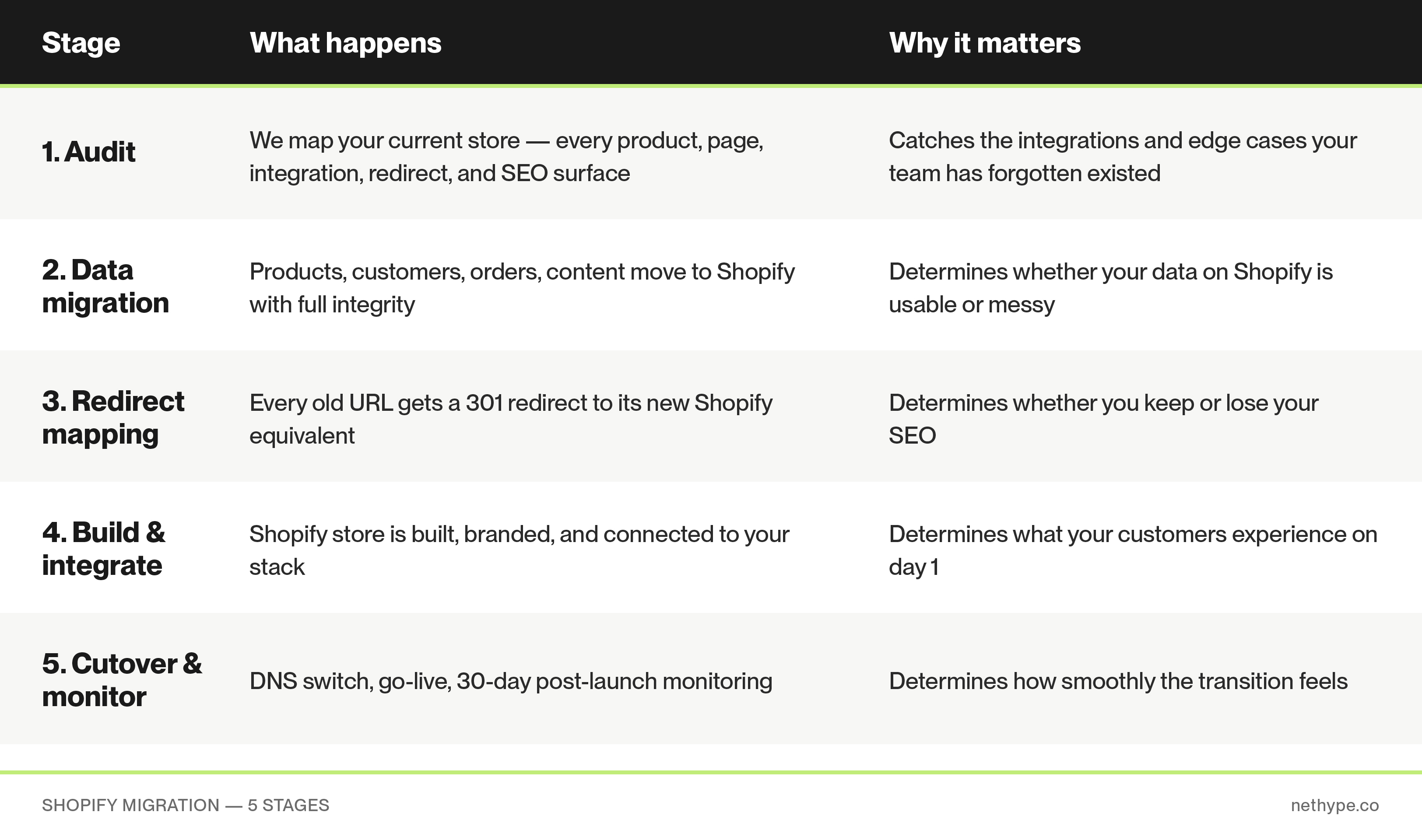
A mature ecommerce store has dozens of integrations, custom workflows, and SEO surfaces that the team has stopped thinking about consciously. The reviews integration set up three years ago. The tax calculation rule for Norway. The custom field that one supplier requires on every order. The redirect that was added when you fixed a permalink in 2022.
None of these things are visible from the outside. All of them break if you forget about them during migration. The audit's job is to find every single one - before migration, not after.
What we map during the audit:
The deliverable from the audit is a single document that lists everything we've found and what happens to it on Shopify. Three columns: "What it is today" / "What replaces it on Shopify" / "Risk level". This document becomes the source of truth for the rest of the project, and you keep it as part of your business documentation forever.
If we could only spend time on one stage of the migration, it would be this one. Here's what's at stake.
When you migrate from any platform to Shopify, every URL on your store changes. Product URLs change. Category URLs change. Blog URLs change. Static page URLs may or may not change depending on your slug strategy.
Google has spent years indexing your old URLs. Other websites link to them. Email campaigns reference them. Ad campaigns point to them. Customers have bookmarked them.
If you don't tell Google (and every other system) where each old URL now lives, you lose the SEO authority those URLs accumulated, and every external link to your site becomes a 404.
The math is harsh. A typical mid-sized store has 60–80% of organic traffic concentrated in 200–500 URLs. If redirect mapping is missed or done poorly on those URLs, you can lose 60–80% of organic revenue overnight.
Industry data: the typical SEO drop in the first month after migration is 20–30% across all platforms when redirects are handled superficially. With proper redirect mapping, our clients typically see a 5–10% drop in week 1 and full recovery - often beyond the original baseline - within 2–3 months, helped by improved Core Web Vitals on Shopify.
This is why we spend 3–5 days on redirect mapping alone. We pull every URL that has ever generated traffic from Google Search Console, your analytics, and SEO tools. We categorize them. We apply transformation rules. We handle edge cases manually. We preserve every redirect that already exists on your old store. We test every redirect before cutover.
If you're evaluating migration agencies and one of them has "set up 301 redirects" as a single bullet point in their proposal - that's a red flag. Ask them specifically how many hours they're allocating to redirect mapping. Anything under 20 hours for a mid-sized store deserves a follow-up question.
We've migrated stores from Magento 2, Magento 1, WooCommerce, PrestaShop, and other platforms - across fashion, beauty, home decor, supplements, and B2B verticals. Two examples worth mentioning (out of many):
MISBHV is a Polish streetwear brand stocked at Selfridges, Browns, and SSENSE. They moved from Magento 2 to Shopify Plus to consolidate maintenance overhead, ship campaigns faster, and prepare for international expansion. The migration involved a multilingual catalog, drop-driven release mechanics, and tight coordination with their wholesale operations.
Floordirekt is a German DTC brand selling flooring, rugs, and home surfaces. The Magento 2 migration involved a large product catalog with complex variant logic (size, material, color combinations) and a German-market integration stack. Migration preserved historical SEO across thousands of category and product URLs.
These are two examples - there are more. If you'd like to talk through a project that's closer to yours, the easiest way is to book a free consultation (info at the bottom).
We don't publish fixed prices, because every project is genuinely different - and a quote based on assumptions is usually wrong. We prepare a quote after an initial consultation where we understand your store, your business, and your goals.
That said, here's how we think about the variables that drive both timeline and cost:
Typical timelines we see in practice:
If you're shopping around for an agency, here are the questions worth asking:
Every store has a different starting point. The fastest way to know what your migration would actually involve - scope, timeline, risks, what we'd recommend - is to talk to us.
We offer a free consultation and quote. Write to info@nethype.co. The first 60 minutes is a conversation about your current store, your business, and your goals. We'll take a live look at your store, identify the specific risks in your migration, and prepare a concrete quote with a timeline. No commitment, no sales pitch. We usually respond within 24h.
If you'd rather start by exploring the Shopify side first, you can also see our theme: Wonder Theme in the Shopify Theme Store → https://themes.shopify.com/themes/wonder
A typical mid-sized migration takes 6-8 weeks from kickoff to go-live. Simple migrations (small catalog, few integrations) can be done in 4-6 weeks. Just a few products? - even less. Complex migrations involving large catalogs, B2B functionality, active subscriptions, or multi-market setups can take 10-14 weeks. The audit and redirect mapping account for roughly 25-30% of the timeline regardless of project size.
If redirect mapping is done properly: a typical 5-10% dip in organic traffic in the first month, with full recovery in 2-3 months and often growth beyond the original baseline due to improved Core Web Vitals on Shopify. If redirect mapping is skipped or done poorly: 20-30% organic traffic loss, with recovery taking 6-12 months or never fully recovering. The redirect mapping process is the single biggest variable here.
Yes. Your domain (e.g., yourstore.com) stays exactly the same - only the platform underneath changes. Customers and search engines see the same domain, just with new URL paths under it (and proper 301 redirects from the old paths).
Yes. Password hashes are not portable between platforms - this is a security feature, not a limitation. After migration, customers reset their password on first login. We coordinate this with an email campaign explaining the change in advance, which typically results in 30-50% of active customers resetting passwords in the first 2 weeks. The rest reset organically as they return to shop.
All blog posts, categories, tags, authors, and metadata can be migrated to Shopify's blog engine. Featured images, alt text, meta titles, and meta descriptions are preserved. Blog post URLs change format depending on the source platform - these get redirect rules like everything else, so SEO is preserved.
Shopify (the standard plan) handles most stores up to about €5M annual revenue. Shopify Plus makes sense if you need: B2B with company accounts and custom catalogs, advanced checkout customization, headless commerce, multiple stores under one account, or transaction volumes that hit Shopify's standard rate limits. We help clients evaluate the right tier during the consultation - there's no benefit to overpaying for Plus if standard Shopify covers your needs.
It's the most common situation we see - and it's manageable. Heavy customization on Magento, WooCommerce, or PrestaShop usually falls into three buckets: (1) functionality that has a native Shopify equivalent (most cases), (2) functionality that needs a Shopify app (many cases), (3) functionality that needs custom development on Shopify (some cases). The audit identifies which bucket each piece falls into and prices accordingly.
Don't migrate during a sales peak (Q4 for B2C, end-of-fiscal-year for B2B). And don't migrate just because Shopify is trendy - migrate because the math works for your specific business.